

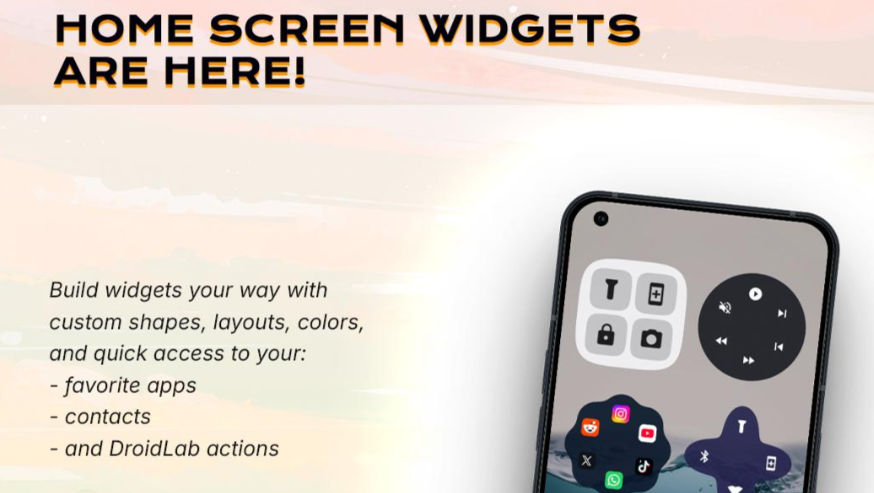
Powerful Android Gestures You Need to Try
DroidLab Gesture Toolkit App. Transform your phone with custom shortcuts. DroidLab uses advanced telemetry and touch sensors to turn gestures like back taps, swipes, rotations, and multi-finger swipes into shortcuts—easy to use even with the screen off! Custom Gesture Mapping and Control Take control of your device’s sensors. Use our calibration wizard to precisely capture your tap strength, rotation angle, and speed. Calibrate sensor sensitivity and gyroscope thresholds to create personalized, false alarm-free, and power-saving gesture settings. Transform your phone automation with custom gestures and powerful shortcut keys. DroidLab uses smart motion tracking and phone touch sensors to turn simple back taps, chops, twists, and multi-finger swipes into instant quick actions—even when your screen is off!
Comprehensive Gesture and Utility Suite Dynamic and Sensor Gestures:
Take full control of your device sensors. Use our precise Calibration Wizard to profile your exact tap strength, rotation, and speed. Fine-tune your gyroscope thresholds and sensor sensitivity for a highly personalized, battery-friendly setup that eliminates false positives. DroidLab requires the Android Accessibility Service API to execute global system actions (such as taking screenshots, locking the screen, and performing swipe up/down navigation), to support the Scroll Assist auto-scroll handle, and to scan screen text for the SnapText tool. It does NOT collect, store, or share your screen contents or personal data.
– Back Tap: Double-tap the back to trigger the mapped shortcut.
– Swipe: Double-tap down to switch the flashlight or perform other actions.
– Quick Rotate: Double-rotate your wrist to launch the camera or an app.
– Flip to Mute: Place your phone screen-down to activate Do Not Disturb mode.
– Raise to Mute: Lift your phone to mute it.
– Wave to Mute: Wave your phone above the front bezel to mute incoming calls.
– Smart Handpiece: Automatically switches to hands-free calling using a proximity sensor.
– Notification Read-Aloud: Wave your phone to read notifications aloud from text.
Smart Overlays and Toolbars:
All-in-One Search: A quick search bar to instantly find apps, solve math problems, or search the web. SnapText Selection: An accessibility text scanner that copies text from any screen. Floating Notes: Write and collapse draggable notes on any app. Sidebar: A slide-out sidebar to launch apps, tools, and custom shortcuts. Edge Sensing: Double-tap, drag, or slide the transparent screen bezel with edge gestures. Notch Touch: Tap or slide the front camera cutout with notch gestures for quick actions. Multi-finger swipe: Use 2, 3, or 4 fingers to swipe in 8 directions to trigger custom shortcuts, with the option to choose a real-time neon touch trajectory. Edge glow: Add a neon glowing border to notifications for selected apps. Camera Toolkit: A camera controller overlay with swipe adjustments to zoom, exposure, lens, and style. Bedside Table: A landscape clock design for your bedside table with a charging screen.
Smart Sensing & Protection:
– Pocket Protection: Prevents accidental touches and pocket triggers.
– Pocket Wake-up: Wakes the screen when taken out of a pocket.
– Smart Backlight: Keeps the screen always on using hand tremor telemetry.
Powerful Shortcuts
Bind gestures and overlays for instant task execution:
– Productivity: Trigger complex automation profiles with Tasker.
– Accessibility: Read screen content aloud or toggle screen zoom.
– Accessibility Tools: Copy screen text, translate, or use SnapText.
– App Launcher: Launch apps, maps, QR code scanners, or local notes.
– System Utilities: Screenshots, lock screen, notifications, quick settings, undo input, or swipe-to-scroll gestures.
– Switches: Flashlight, microphone mute, Wi-Fi, Bluetooth, mobile data, and Do Not Disturb mode.
– Media/Volume: Play/pause, skip tracks, volume adjustment, or background timer.
– Incoming Call Reminder: Provides haptic feedback when answering outgoing calls.
– Taptic Touch: Provides advanced haptic feedback for all action triggers.
Battery Safety Noise Cancellation
DroidLab isolates actual chassis impact shockwaves and filters out everyday walking or shaking vibrations. Using Peak-Width Guards and pocket detection, we ensure zero pocket triggers and extremely low battery drain. All motion telemetry, notification reading, and floating notes are processed 100% locally on-device. We never collect, store, or transmit your personal data. DroidLab isolates the device from shockwaves and filters out vibrations from walking or shaking. We employ peak width protection, gyroscope suppression, and pocket detection technology to ensure zero pocket triggering and extremely low battery consumption. All telemetry data, notification reads, screen scans, and hover notes are 100% processed locally on the device. We never collect, store, or transfer your personal data. Fully supports offline use. Accessibility API Disclosure DroidLab uses the Android Accessibility Services API to perform global system actions (such as taking screenshots, locking the screen, and performing swipe-up/down actions) and scans screen text on demand for use with the SnapText selection tool. It does not collect, store, or share your screen content or personal data.