
Glyf – The Smartest Way to Launch Apps on Android 🚀
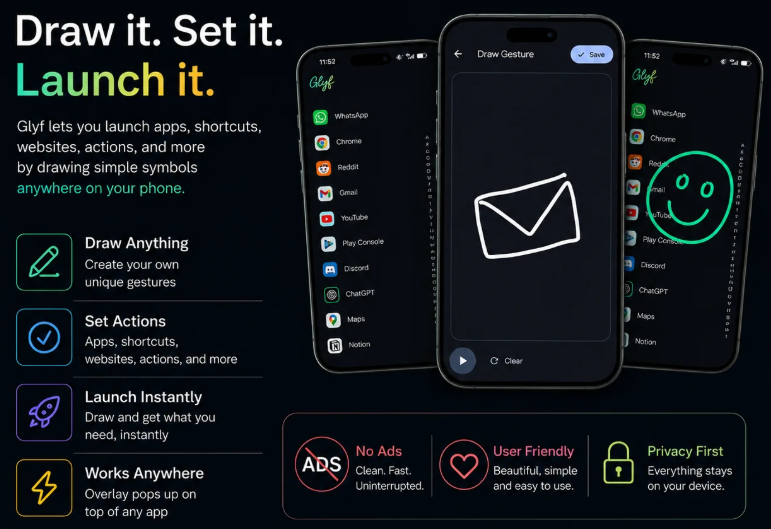
Glyf lets you launch apps, links, phone actions, and flows with a simple gesture. Tap a widget, notification, or Quick Settings tile, draw your Glyf, and your shortcut runs instantly. No searching. No clutter. Just muscle-memory speed.
Key Features
• Draw custom gestures to launch apps instantly
• Open websites, deep links, and Android actions with a stroke
• Trigger useful phone actions like flashlight, camera, timers, settings, media controls, volume, brightness, and more
• Build Flow Glyfs with multiple steps and conditions
• Start Glyf from a home screen widget, persistent notification, or Quick Settings tile
• Customize stroke color, width, style, glow, and spacing
• Backup and restore your Glyfs
• Clean, fast overlay interface
• No accessibility permission required
How it works
1. Create a Glyf
2. Choose an app, website, action, or Flow
3. Draw your gesture
4. Tap your Glyf trigger and draw to run it
Glyf is designed for speed and muscle memory: your most-used actions, one gesture away.
Turn Your Drawings Into App Shortcuts!
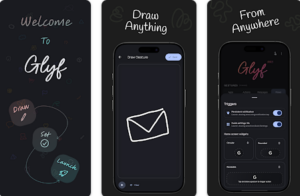
Glyf offers a convenient solution for enhancing your glyph-drawing experience on Android devices. By enabling a distinctive overlay feature, it facilitates a streamlined process for inputting, tracing, and referencing glyph patterns. After launching the app and starting with an easy-to-recognize blue icon, you can seamlessly switch to Glyf mode. Here, the app provides a drawing area overlay to quickly and efficiently trace glyphs as they appear on your screen. This method enhances precision, making the app an invaluable tool for tasks involving pattern recognition.
Optimized Drawing Experience
Glyf distinguishes itself by allowing repeated glyph entry up to five times before switching to display mode. In this mode, the app showcases previously drawn glyphs, enabling you to reference and input them efficiently. This function is particularly useful for users who need to practice or reference intricate glyph designs frequently. With intuitive interface features, Glyf ensures a user-friendly experience tailored to your needs.
Versatility and Advantage
One prominent advantage of using Glyf is the ability to customize the drawing area’s position by simply dragging the icon vertically. This flexibility allows for an adaptable user experience that caters to diverse preferences and screen setups, providing maximum comfort and accessibility. Whether you’re a beginner or an experienced user, the app’s features promote ease of use and precision.
Employ Glyf on your Android device to refine your glyph interactions through its innovative display and input methods designed for efficiency and accuracy.The fact that you used to have the overlay bubble to allow you to open the draw pad anywhere, in the free tier and now locked it behind a paywall, Pro version is really messed up. At this point I’m starting think that you guys are greedy and it was already bad enough that you only get 3 shortcuts that you can use in a free version. That’s ridiculous, so yeah I’ll be uninstalling this app for the fact that you just don’t care enough about all your users. Not just paid ones.
I understand your frustration. The floating bubble is a Pro feature because we want supporters to receive meaningful value in return. A free trial is coming in the next update. If you just want to launch Glyf from anywhere, it also exposes a shortcut that works with any gesture app, including Smart Action Notch, One Hand Control etc.
This App Changes How You Open Apps Forever!
I was interested in trying this out for a bit, but found it has a limit of 2 and then demands $9.99 to do anything additional. Sorry, this app is not worth that price tag IMO and will uninstall Edit: You changed your response from email for a promo code to now say “it is clearly listed on the Play Store description”, but it actually is not. The “About this app” does not mention a limit of just 2 in the free version/trial or purchase of $9.99. The Pro features and pricing are clearly listed on the Play Store description. If you have any questions regarding Pro, please contact us at quarkstudio.help@gmail.com and we’ll be happy to clarify any concerns.
It looks good but I found that it doesn’t detect sometimes, very less but it’s there. And for free user just 2 is very less and no bubble also makes it useless as a free app. Also it’s pricer, so wait for the sale to buy it. We’re sorry the free version didn’t meet your expectations. We’re continuously improving gesture detection, and we’ll also keep refining the free experience in future updates. We appreciate you giving GLYF a try and hope we’ll earn your 5⭐️ soon. Tap a widget, notification, or Quick Settings tile, draw your Glyf, and your shortcut runs instantly. No searching. No clutter. Just muscle-memory speed.