

This Smart Assistive Touch App Makes Android So Much Better! 🚀
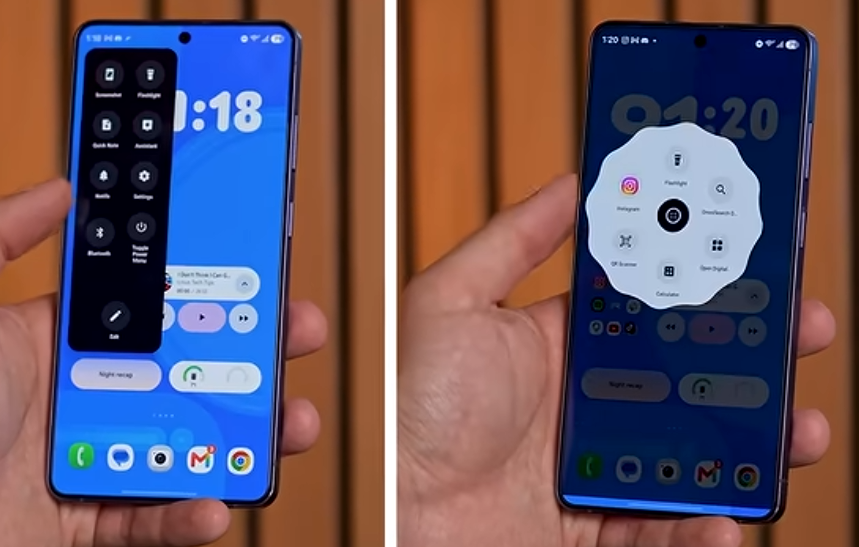
NavEdge is a customizable floating action button and overlay controller that brings system navigation, quick settings, and media playback controls directly to your fingertips. Inspired by assistive touch widgets and navigation bar utilities, NavEdge sits subtly on your screen edge, allowing you to control your Android device with simple swipes, taps, and gestures. Whether you want to navigate your phone with one hand, control your music without leaving your current app, or quickly toggle system settings like brightness and DND, NavEdge provides a smooth, customizable experience tailored to your workflow. One Hand Gesture Navigatione your device effortlessly using a floating shortcut button that replaces traditional navigation bars.
Perform standard system actions like Back, Home, and Recents. Trigger gestures such as double taps, long presses, or edge swipes to open custom menus. Pull down the notification panel or quick settings drawer instantly. Media Player and Music Controller your background music and media apps through a floating audio widget. Access state-dependent Play, Pause, Next, and Previous controls. Adjust volume levels with a smooth, responsive slider. View track details and open your active music player with a single tap. Quick Settings Toggles and Utilities Access essential hardware settings and tools directly from the overlay menu.
Toggle flashlight, screen rotation lock, and Do Not Disturb (DND) modes. Adjust screen brightness and system volume with interactive sliders. Launch helper tools like the calculator, system camera, and screenshot capture. Open the system power menu safely without physical buttons. Premium Theme Customization Make NavEdge match your phone setup with an advanced visual style engine.Select from 48 calibrated color themes, including Nothing Dark, Nothing Light, Night City, Sunrise, Dune Harvest, and Cotton Candy. Enable dynamic Material You integration to automatically match your Android wallpaper colors. Create and preview your own palettes with an interactive hex color theme editor. Unique Interface Styles Choose a unique personality and shape layout for your floating button.
Nothing Style: Minimalist dots and monochrome aesthetics. Cyberpunk HUD: Vibrant neon colors and futuristic geometries. RetroOS: A classic Windows 95 inspired desktop theme.
Liquid Style and Tonal Style: Organic shapes and smooth color gradients. Custom Icon Packs Swap icon designs to fit your aesthetic. Choose from preloaded packs including Lucid, Trace, Box, Tabler, Pixel, Feather, Remix, and a custom Minecraft pixel-art set.
NavEdge Assistive Touch is a utility application designed for Android devices, serving as a powerful control center. This app features a floating button that provides quick access to essential functions such as home and volume controls, as well as instant access to favorite contacts and applications without leaving the current app. Users can perform various gestures, including one-touch access to a floating panel, double-tap to lock the screen, and long-press to hide the button while still receiving notifications.
NavEdge is designed for users who want to streamline their multitasking, protect physical volume and power buttons, or navigate large screens with one hand. It runs efficiently in the background, respects device performance, and does not require complex root access to unlock its features. Simplify your Android experience. Download NavEdge today and customize your floating navigation deck.
Assistive Touch for Android has become an indispensable tool for many people to help them in many different aspects. The necessary features can be attached to many necessary features to activate more quickly. Over time, the buttons that take on the task will not need to work and still maintain a stable state.
Everyone can completely access the same features as on the IOS platform. Everything you need is gathered in a single area and always floats on your screen over time.
- Quick Access: Accessing a variety of apps, settings, and functions can be done easily. In particular, everyone can completely access everything through the corresponding customization process.
- Gesture Support: This use is often well associated with many different operations that you cannot ignore. Over time, you may discover completely new gestures that can be assigned to different features.
- Customizable Shortcuts: All features are gathered in a single button that you cannot ignore. So you can add frequently used features and quickly associate them with multiple gestures to open them faster.
ENHANCED DEVICE CONTROL
Using an assistive touch completely meets the needs of each user. This is completely understandable because anyone does not want to use the device’s hardware too much to avoid damaging them.
- Accessibility Features: Necessary features can be associated with different gestures that you cannot ignore. So you can adjust it as freely as possible and gradually ignore the use of buttons.
- Virtual Home Button: Opening the screen is no longer a feature that is too difficult to perform through interacting with the screen. This way, you can minimize the need to press a button for too long and make the most of your device’s potential.
- Screen Capture: Some of the most commonly used elements by users, such as screen capture, can be activated much faster. Instead of having to press multiple buttons at the same time, let assistive touch take care of the rest.

Bohot achha