
Best Android Apps 2026: Crazy Secret Android Apps You Won’t Find Easily
Are you bored of using the same old default setup on your Android phone? Do you want to transform your smartphone into a super-fast, ultra-smart, and completely unique device? If your answer is yes, you have landed in the right place! Google Play Store hosts millions of apps for android. However, nearly 90% of them offer the exact same basic, repetitive features. But don’t worry! Today, we are breaking down the top 5⚡️ best android apps that are so hidden and powerful, they are almost impossible to find on your own. In fact, some of these tools aren’t even directly available on the standard Play Store index. If you enjoy watching crazy tech tricks on popular YouTube channels like miss zeenat or mr mobiloon apps, this ultimate list will deliver that exact next-gen experience. These hidden android apps are designed to streamline your daily workflow and boost productivity. Let’s jump straight into the top picks for the best android apps 2026!
Top 5⚡️ Best Android Apps You Must Try Right Now
We have ranked these secret android apps based on their utility, features, and user performance. Let’s dive into each tool in detail.
1. Droid app Gesture Control
This app is built for anyone looking to overhaul their daily phone navigation. Using this droid app, you can completely redefine standard gesture controls on your device.
- YouTube Gesture Forwarding: No more tapping onscreen buttons to skip scenes. Simply swipe right or left on the screen to instantly fast-forward or rewind your video.
- Auto-Scroll Feature: Reading long articles on Google Chrome or web browsers? The auto-scroll feature automatically moves the webpage down smoothly, saving your thumb from constant scrolling.
- Custom Double-Tap Actions: Map custom shortcuts to a double-tap gesture—turn on the flashlight, launch the camera, or open your favorite tool instantly.
If you want to turn your smartphone into an effortless smart remote, this tool belongs at the top of your useful android apps folder.
2. Volume Plus Plus (Volume++)
Volume Plus Plus is an absolute gem that redefines background multitasking. On standard Android devices, running heavy games or other applications simultaneously alongside YouTube video playback can cause lag or app closures. This tool solves that limitation seamlessly.
- Background YouTube Playback: Run YouTube videos in the background minimized without any interruptions.
- Multi-App Minimization: Keep multiple active apps minimized and running simultaneously.
- Uninterrupted Gaming & Audio: Play your favorite mobile games while keeping background music, podcasts, or YouTube audio actively streaming.
This application is a must have android app for power users and heavy multitaskers.
3. Mechanly App – AI Powered Phone Automation
Inspired by advanced automation suites like Samsung Bixby Routines and top-tier ai android apps, Mechanly App automates your repetitive daily digital tasks completely hands-free.
User Command ➔ AI Task Processing ➔ Automated Execution (Mails / Rides / Posts)
Key Highlights of Mechanly App:
- Voice-Triggered Actions: Give a quick voice command, and the app will book your rides on platforms like Uber or Rapido.
- Auto Emailing: Draft and send emails automatically with simple voice confirmations.
- Social Media Automation: Schedule and post content to Instagram or Facebook without manual typing.
- Smart Notification Summaries: Organizes missed notifications and highlights priority updates automatically.
Among all 2026 android apps, this tool stands out as a futuristic assistant that converts your device into a fully automated AI workstation.
4. Beta Source – Early Access Beta Tester Finder
Struggling to find open Beta testing slots for popular applications? Finding active Beta access links for apps like WhatsApp, Instagram, Telegram, ChatGPT, or trending games often requires digging through dead forum threads. Beta Source eliminates this hassle entirely.
How Beta Source Works:
- Scans all installed top android apps on your smartphone.
- Provides a direct, one-tap navigation link to official, active Beta enrollment pages.
- Want ChatGPT Beta features early? Simply select ChatGPT inside the app, tap Open Page, scroll down, and click Join. You’re instantly enrolled as an official Beta Tester.
You no longer have to spend hours searching tech forums just to test unreleased software updates.
5. Glyf – Gesture Shortcut Launcher
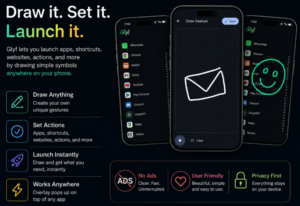
If you have over 100 applications installed, searching through the app drawer continuously becomes tedious. Glyf completely bypasses standard app drawers using quick gesture shortcuts.
- Draw to Launch: Draw a W anywhere on your screen to launch WhatsApp instantly. Draw a C to open ChatGPT immediately.
- Universal Access: Draw gestures over any active app—whether you are watching YouTube or browsing the web—to switch tools instantly.
- Custom Gestures: Map any custom letter, symbol, or shape to launch specific applications or system shortcuts.
It is a dream utility for android customization enthusiasts looking for the fastest device navigation possible.
Comparison of Top Secret Apps
| App Name | Main Feature | Ideal For | Availability |
| Gesture Navigation | Swipe-to-skip & auto-scrolling | Article readers & video streamers | Web / APK |
| Volume Plus Plus | Background playback & app minimization | Power multitaskers & gamers | Direct APK |
| Mechanly App | Full AI phone automation | Busy professionals & power users | Play Store / Early Access |
| Beta Source | One-click Beta Tester enrollment | Tech enthusiasts & early adopters | Web Source |
| Glyf | Draw gestures to launch apps | Customization enthusiasts | Play Store / Free Download |
Smart Android Customization Tips & Tricks for 2026
Downloading hidden apps is only step one; use these android tips and tricks to build a clean, hyper-responsive home screen setup:
- Adopt Minimal Launchers: Pair your utility tools with lightweight launchers like minimaa launcher to save RAM and optimize battery longevity.
- Clean Up Notification Banners: Turn off non-essential notifications to keep your status bar clutter-free and maintain focus.
- Chain Automation & Gestures: Combine ai android apps like Mechanly App with gesture shortcuts in Glyf to trigger complex micro-automations instantly.
Conclusion
These hidden gems represent the top apps 2026 has to offer for boosting your smartphone experience. Whether you want to launch apps with simple screen drawings, run YouTube seamlessly in the background, or automate complex daily routines using AI, these free apps make your device significantly faster and more productive. Give them a try and see how much time they save you every day!
Which of these crazy hidden applications are you planning to download first? Let us know in the comments below, and don’t forget to share this article with your friends and tech groups!
Frequently Asked Questions (FAQs)
Q1. Are these hidden Android apps safe to install?
Yes, absolutely. These applications are safe to use. Most of them are developed by verified creators or well-known open-source developers. Always review app permissions during setup as a standard security practice.
Q2. How do I download applications that aren’t on the Play Store?
Apps not listed on the standard Google Play Store can be downloaded safely directly from their official developer websites or trusted APK repositories.
Q3. Which Android apps are trending the most in 2026?
In 2026, AI automation applications like Mechanly App, gesture launchers like Glyf, and minimal home screen setups using tools like Minimaa Launcher are seeing the highest adoption rates.
Q4. Do these customization apps drain device battery quickly?
No. These top apps are lightweight and highly optimized to ensure minimal background resource consumption, keeping battery impact practically negligible.
Watch Full Video